
Deepgram text-to-speech
Deepgram is one of the text-to-speech services you can select for a bot connection, while creating the connection or later on its Settings tab.
To use Deepgram for text-to-speech:
-
From the 'Text-to-speech provider' drop-down list, select Deepgram.
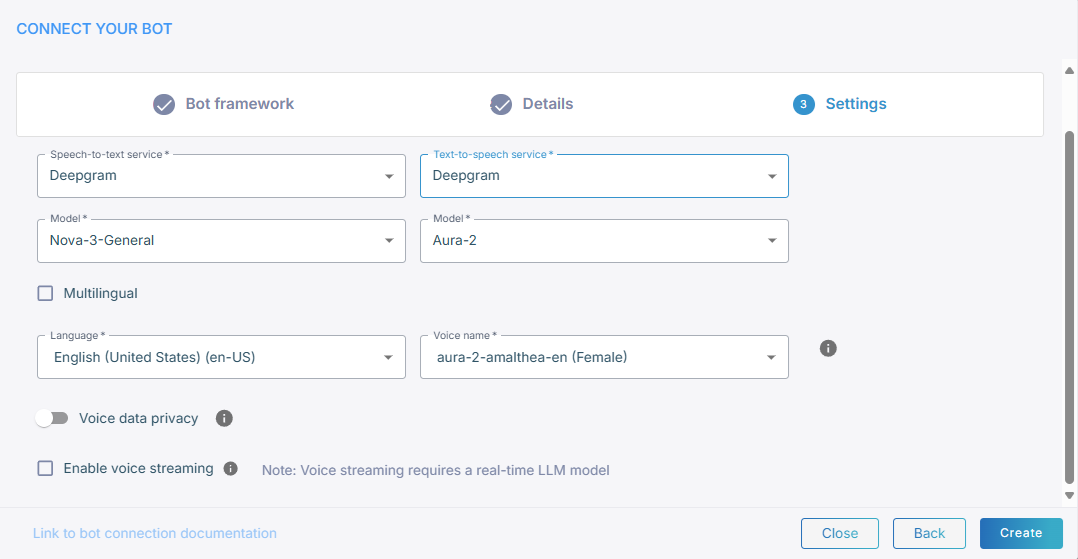
-
From the 'Model' drop-down list, select the model, for example Aura-2.
-
For multi-language support, select Multilingual, and then set 'Main language'. Otherwise, select the language from the 'Language' drop-down list.
-
From the 'Voice name' drop-down list, select the voice the caller hears.
-
Decide whether to leave 'Allow Deepgram to use the audio data to improve its models' on. See Data sharing.
-
Click Create.
Data sharing
'Allow Deepgram to use the audio data to improve its models' is on by default. While it is on, Deepgram may use your call audio for model development under its own usage terms.
Turning it off excludes your call audio from Deepgram's training and raises the usage cost.
Advanced parameters
For the advanced configuration parameters Deepgram accepts, see Deepgram speech provider.